Simple Solutions to Positively Impact Your Users While Improving Your Print Infrastructure

When SmartPrint engages in an MPS assessment with a prospective client our team has a thorough approach to assess the current state and build a future state that incorporates best practices in several different areas. One of the areas that can make a significant impact but doesn’t always get enough attention is our recommendations for print infrastructure best practices. Many organizations want to tackle print infrastructure changes in future project phases, but we believe it is important to tackle them as part of a full MPS implementation, or MPS partner change. I’ve put together the top 4 print infrastructure changes that are easy to accomplish, but also provide improvements for your users and your IT support team. Keep in mind that each solution below can be managed for you and can be included as part of our SmartPrint 360 program.

    1. Eliminate your print servers 

This is a very simple transition that is frankly a no-brainer. You can easily migrate your existing printer objects to a cloud application that enables you to eliminate all print servers. You can centrally manage all print devices, settings and drivers, and deploy new print devices and updates to the whole organization without building scripts or using GPOs. The solution enables managed direct IP printing that is 100% local to your network so your users will have an always-up print environment, even if internet connectivity goes down.

Benefits

  • Up to a 95% reduction in printer-related helpdesk calls
  • User convenience with simple self-serve abilities
  • Flexibility for mobile users with access to install printers themselves
  • Eliminate the costs and time to manage and maintain print servers
  • Secure your print environment with a Zero Trust compliant solution that will authenticate all users prior to printing

    2. Implement Print Security Software

First off, I’ll clarify that the print security software that we recommend is HP Security Manager. Clearly, this is a solution that you would implement if you have a fleet of HP print devices. Keep in mind that approximately 70 of mid-market and enterprise businesses in Canada use HP print devices in their businesses. As cyber-criminals increasingly target print infrastructures to gain access to networks, implementing print security software cannot be ignored. HP’s Wolf Security software enables you to lock down your print infrastructure by forcing and automating a security configuration across all of your HP print devices. If a new device is implemented, or an existing device goes offline and reboots, the devices look to the security software for their configuration. This ensures that your configuration policies are always in effect.

Benefits

  • Automated policy management 
  • Certificate management for compliance
  • Fleet security reporting to show areas of risk
  • Most move from 25% security compliance to 97% security compliance just by implementing the tool

    3. Implement simple scan to OneDrive software

Most organizations have their print devices set up to use the scan-to-email function so that users can get scans back to their PCs. I’ll let you in on a little secret, scan-to-email is extremely inefficient, it requires too many steps while also causing your email system storage to increase rapidly. Your current scan-to-email workflow has approximately 13 steps the user must work through to complete a scan. This can be reduced to 3 steps; this is clearly another no-brainer that saves time and confusion for your users.

Benefits

  • Reduce the users’ time at the print device by more than 75% per scan
  • Stop clogging the email system with multiple versions of large files
  • Secure the document environment by not enabling scanned documents to leave your network via a print device


    4. Move your fax service to a cloud-based software as a service

Yes, fax is still a thing. Although fax volumes are coming down in many businesses it is still a required utility for most verticals including healthcare, legal, finance and banking, manufacturing, distribution and construction companies. If you are still using fax lines or fax server software, it’s definitely time to make a change. There’s no question that fax is a service where the volume will slowly dwindle over several years. Making a change to a cloud fax service will simplify the service so that no one will have to deal with it again until it’s time to turn the service off. The fax wind-down has been a very slow burn and who knows when it will become extinct.

Benefits

  • Implement a bulletproof cloud fax service that includes support, while increasing security and compliance
  • Pay for the actual fax volume you use with a simple monthly subscription, as volume decreases over time so do your costs
  • The transition can be seamless to your users
  • The solutions can scale to support the large enterprise
  • Reduce costs by eliminating fax boards, fax server software licenses and/or analog phone lines

If you would like more information, be sure and reach out. SmartPrint can provide a free print infrastructure assessment and share the potential options for each area mentioned above to see if there is a fit for your organization. 

Without central control of your print fleet, security settings are extremely difficult to manage, and entry points for cybercrime are more easily overlooked. It becomes even more complex supporting work-from-home employees and integrating equipment to workflow automation systems.  Your IT team could be focused on configuration settings and authentication rather than working on other valuable IT projects or support. Encryption and authentication can be accomplished universally with an integrated automated security management tool. We’ve had great success with HP Security Manager, ask one of our experts to share best practices in this area.

Hybrid Workers Can Cause Your Organization to Be More Vulnerable to Cyberattacks

Cybersecurity has increased in priority for CIOs for several years and it is still a top 3 priority according to the top industry analysts. There have been several large-scale global cyberattacks that most companies were able to avoid with solid IT security plans and protocols, but there have been some changes in where and how employees work that has increased the number of cyberattacks. Remote and hybrid work can have some significant advantages for companies and employees, although there are potential unforeseen IT issues that could impact an organization.

Given that the hybrid work model will be around for the foreseeable future,  there are some cybersecurity risks to mitigate. With more work from home time, your employees may be more comfortable using their personal devices for work functions which can open more areas for risk. Most employees are quite savvy and are not clicking on links in unknown emails or on ad-filled websites; however, if their work device is used by someone close to them (child, partner etc.) cybersecurity risk is again increased. Employees working from home and connecting to your company’s network with personal devices including tablets, PCs, mobile devices and printers that potentially were not built to support your business’s security plan can pose an additional risk.

Enterprise-level business devices most often have onboard software to fight cybersecurity threats and are configured with business-grade antivirus software and authentication requirements. When personal devices connect to a company’s network there could be dangerous security vulnerabilities that are innocently introduced. In a recent survey, HP found that more than 30% of employees said they have used their personal computer to access the corporate network. 

The move to more hybrid workers in your business will definitely open your business up to more potential security breaches. The number one preventative step is employee cybersecurity training. Letting one of their kids use their business laptop for homework doesn’t seem like a big risk but it could be. We would recommend a cyber security education training program for employees. As much as it is a pain, having forced strong passwords that must be updated quarterly will help, and it’s important to ensure that employees do not use unsecured personal devices to connect to corporate servers and systems.

In the past year, more than 40% of IT Security Professionals have seen evidence of a print device being used as an entry point for an attempted cyberattack. It’s important to ensure that hybrid workers do not use personal print devices that are not equipped to protect against a cyber breach that could expose corporate data that is stored on the print device. Best-in-breed enterprise-level print devices have multiple layers of security including firmware that is updated, configuration best practices and print security software that can self-protect against cyber activity. We would suggest transitioning home office users away from using unsecured personal print devices for print and scan, and instead, using mobile print solutions that can enable employees to send a document to print at the office, or scan a document and route it to a business document management system or workflow with the user’s smartphone, tablet or PC. 

Now that many employees and their devices are out of sight, IT professionals’ ability to stay on top of connected user devices is more complex. When it comes to keeping your business safe, it may be important to educate your employees and ensure they have the tools they need to safely work with printed and digital documents. 

If you are interested in learning more about protecting your business and enabling your hybrid worker the ability to safely print and share documents be sure and contact us

Without central control of your print fleet, security settings are extremely difficult to manage, and entry points for cybercrime are more easily overlooked. It becomes even more complex supporting work-from-home employees and integrating equipment to workflow automation systems.  Your IT team could be focused on configuration settings and authentication rather than working on other valuable IT projects or support. Encryption and authentication can be accomplished universally with an integrated automated security management tool. We’ve had great success with HP JetAdvantage Security Manager, ask one of our experts to share best practices in this area.

A Business Leader’s Purpose Is to Optimize the Flow of Information Through Their Company

The most successful businesses typically have well-oiled processes
and integrated systems and processes across every department.
Many successful Canadian companies that have focused on optimizing processes across their business systems are the leaders in their specific industry because of their efficiency and the ease of doing business that their customers experience. Most of the business processes in an organization focus on moving digital and paper-based documents through the business to make things happen internally and externally. Well-oiled traditional systems, even when highly integrated, have gaps in business processes that need to be bridged by people (employees). The next level of optimization is embracing digital transformation. The Wikipedia definition of digital transformation is “the adoption of digital technology by an organization to digitize non-digital products, services, or operations. The goal for its implementation is to increase value through innovation, invention, customer experience or efficiency”.

Given that basically, all information that flows through an organization is some type of document (hard copy or soft copy), your managed print services provider should have significant expertise in helping to automate and transform your business processes. 

When looking at the best-in-breed software solutions supporting digital transformation there are purpose-built applications that can automate a manual function like accounts payable data entry, and there are solutions that have an infinite number of processes that can be automated because they have flexible workflow tools that we can build almost any manual document process into an automated process while supporting integration to your existing software systems. Think about the possibilities.

Where is the low-hanging fruit in your business? Look for the following:

  • Departments with stacks of paper and filing cabinets 
  • Business processes that result in high levels of variation or errors
  • Any business process that has manual data entry ie. accounts payable, shipping/distribution
  • Business processes that require approvals and audit trails ie. human resources, procurement, payment
  • Areas where employees search for documents and have challenges retrieving them in a timely basis ie. contracts management, customer service

Here are a few ideas where departments may enable a quick win:

  • Finance & Accounting
    • Integrate to ERP to enable standardized and automate AP processes 
    • Transition paper-based financial reporting and budget approvals to automated workflow with an audit trail
    • Automate and track PO payment approvals
  • Operations & Administration
    • Contracts management with review and approval anytime from any device
    • Integrate seamlessly with your CRM to access Contracts, Statements of Work and Non-disclosure
    • Training management
    • Supply chain logistics management
  • Human Resources
    • Employee onboarding
    • New hire requests
    • Employee self-service portal
  • Manufacturing / Construction
    • Digitally manage compliance and safety documentation processes and audits
    • Construction document management anytime, any device access

If you are a mid-market company that is interested in increasing efficiency to make it easier for your customers to do business with you, or simply to compete in your space through productivity improvements in your business, I recommend talking to your MPS experts who should have the ability to recommend the best solution to enable a quick win that your organization can build from. The leaders that drive their businesses to optimize the flow of information with intelligent workflow technology will be the leaders in their space.

Contact us if you would like to engage in an informative discussion regarding automated workflow.

HP Capture and Route is a great example of a digital management tool that can automate the ingestion of content from multiple inputs and flow the content right into automated workflows built in an intelligent workflow software solution. We have had a lot of success with this tool as the front end of a fully integrated business workflow system. With our intelligent workflow solutions, we have multiple options of best-in-breed platforms and we ensure that all of the applications are agnostic so if there are changes in your environment your workflows are intact for the future.

What’s the Best Approach for Consolidating Your Office Print and Workflow Hardware to Support the New Normal?

Many Canadian organizations are readying their offices for an increased number of workers. It’s very clear from our discussions with clients that professional services organizations are adopting the hybrid work model while focusing on trying to lure more employees back to the office to inspire culture building teamwork. The plan of trying to get workers into the office at least 2-3 days a week, for now, seems to be consistent. Office workers that have embraced working from home have changed their habits around printing hard copy documents, and have moved to working with software tools that support editing and updating documents on their screen and flowing documents through their process in the original digital format. Firms don’t want employees to revert back to printing like they did pre-covid. To support a continued reduction in office printing IT and Administration leaders are interested in moving to a more consolidated fleet of equipment; basically getting printers off of people’s desks and bringing multi-function print equipment closer to the user groups with the power of workflow. The goal is to keep the learned efficiency gains of users working with digital documents while still empowering users with print equipment that is only a few footsteps away. Many organizations have also recognized that the reduced print volume has positively impacted their carbon footprint and want to continue supporting this reduction. We currently have a couple of dozen print consolidation projects running with mid-market and enterprise clients and prospects, and there is demand for more.

Here are some of the benefits of completing an office print device consolidation plan:

  • Reduce the number of devices and simplify and reduce monthly MPS billing
  • Reduce carbon footprint by using original supplies and implementing Energy Star certified equipment 
  • Save real estate space
  • Increase end-user productivity by bringing more powerful functionality closer to the user
  • With a future state you will have the print equipment and print infrastructure to successfully implement automated workflow solutions to improve further productivity and convenience for users

If your organization is interested in updating and consolidating your print environment to empower your employees, here’s what to expect.

Office print consolidation project stages with high-level details:

  1. Print Infrastructure Current State Assessment
    a.
    Print servers and device driver management
    b. Print security and device firmware management
    c. Print device security configuration automation/reporting capabilities
    d. Scan and fax process, tools and systems 
  • Deliverable: future state recommendation with best practices in each area


     2. Current State MPS Financial Assessment 
          a. Fleet age, volume, end of life equipment
          b. SLA data, volume vs service interval correlation

      • Deliverable: Current state total cost of ownership report

           3. Site Assessment – as required developed with key stakeholders and IT
               a. Floor print layout with current state equipment and user groups
               b. SME and user discussions
               c. IT team project lead
               d. Software solutions to support productivity improvement opportunities

      • Outcome: Device plan for each location/floor/department

          4. Draft and Final plans for implementation

      • Outcome Future state plan, business case, budget, and implementation plan to go live that includes hardware, software, and all MPS services with one simple flat monthly fee

      An MPS expert can work through this process with your team to ensure a successful future state that supports long term increases in efficiency gains. As a bonus, 95% of the work is completed by an MPS expert with light support from your team. Whether you are an existing  SmartPrint client or an organization looking for help, you’re welcome to reach out for a brief discussion to see if we can be of service.

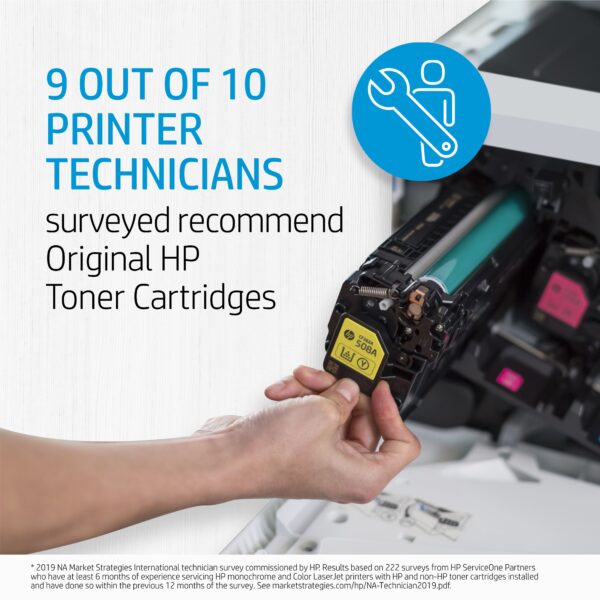
      printer technicians recommend hp oem toner cartridgesSometimes what looks like savings can turn into a hassle. If you are running aftermarket supplies in your print devices, reach out to see how we can help to convert you to OEM. We typically find that we can help our clients make the change to OEM without impacting the total cost of ownership and the monthly operational cost to run the print environment. If you are currently running OEM supplies and are thinking about trying aftermarket supplies to try and save some money, there may be a better way to save! Reach out to talk to one of our MPS experts.

      HP OEM supplies provide the confidence you can rely on for everyday printing. HP is committed to the environment by using recycled materials in new cartridges and offering a free recycling program from one of the 100 most sustainable companies in the world. Supplies also meet eco-label emission criteria to help maintain the air quality. Trust is also provided from the packaging to the chips to use supplies that protect your printer and your data. Lastly, peace of mind is provided in knowing that you are using HP OEM supplies.

      Increased Productivity for the Hybrid Workforce With Digital Workflow

      As we all know, in the last couple of years the number of hybrid workers has
      increased dramatically. I found some interesting data that supports the view that the hybrid work model is here to stay; 77% of remote workers show increased productivity (
      source), roughly 40% of Canadian jobs can be done from home (source), and companies that allow remote work have 25% lower turnover rates than those who don’t (source).

      The next challenge for businesses is to ensure that hybrid workers are integrated into their business workflows so that the speed of processing can increase, whether an employee is in the office or working remotely. It’s never been more important for businesses to stay competitive and significant productivity gains can be accomplished by implementing automated digital workflow to transform your current manual business processes. If you can successfully deploy automated workflow the hybrid worker can be as productive in the office as they can while working from anywhere, and the remote and office team members that work together become seamlessly connected. 

      Top 5 business functions where workflow automation can easily improve efficiency:

      • Accounts Payable
      • Contracts Management
      • Procurement
      • Human Resources
      • Sales and Customer Service

      Top 4 benefits of workflow automation:

      • Increase speed and accuracy – drastically reduce human error by automating error prone repetitive tasks like data input 
      • Data security with encryption – when the information and processes are digital, they can be secured and protected
      • Increase the speed of approvals – your business can move faster with approval integrated into the work process providing automated notification to the approving manager
      • Reduced paper – digital data capture of all related documents that are searchable

      Businesses are now focused on learning about the best solutions to support moving to intelligent automated workflow so they can accelerate their business processes. If your business strategy is to become more productive with your current team by embracing a plan to achieve operational efficiency, reach out to talk to one of our experts. 


      Without central control of your print fleet, security settings are extremely difficult to manage, and entry points for cybercrime are more easily overlooked. It becomes even more complex supporting work-from-home employees and integrating equipment to workflow automation systems.  Your IT team could be focused on configuration settings and authentication rather than working on other valuable IT projects or support. Encryption and authentication can be accomplished universally with an integrated automated security management tool. We’ve had great success with HP JetAdvantage Security Manager, ask one of our experts to share best practices in this area.

      Back to the Office, It’s Time to Look at Simplifying Print Infrastructure and Print Hardware

      The downtown core in major cities across Canada is slowly coming back to life with many companies bringing employees back to the office 2 to 3 days per week. There are a lot of changes being made to office spaces to support the new hybrid workforce. There are updates happening in the physical office space, giving office workers more room while updating furniture in support of shared workspaces and creating more areas in the office for face-to-face collaboration. There’s also increased investment in technology, both hardware and software, to ensure that users can productively work from anywhere. At SmartPrint, we have a lot of projects on the go to help our clients simplify printing in the office by updating and consolidating hardware as well as updating the print infrastructure.

      Here are some of the areas to look at improving while updating the office print and copy environment:

      • The need for advanced security for your print infrastructure has increased
        • Implement software to automate device security configuration with vulnerability reporting capabilities
        • Implement print device firmware management services to ensure your fleet is secure and consistently updated to current firmware levels
        • Upgrade to print hardware that can sustain a cyber attack; some manufacturers are ahead of the curve in this area
      • Cloud print server – choose the correct option to ensure a successful transition
        • Ensure the tool you select can enable the use of advanced device functions like staple, hole punch, collating, etc.
        • Enable users to self-serve when connecting to an alternate, or new print device
        • Ensure that printing can be accomplished if your internet is down
        • Implement a tool that avoids the additional cost of connectivity to your cloud provider
      • Equipment consolidation
        • Reduce the number of devices and reduce costs
        • Reduce carbon footprint by using original supplies and implementing Energy Star certified equipment 
        • Save real estate space
        • Increase end-user productivity by bringing powerful functionality closer to the user
      • Intelligent Workflow
        • Reduce paper and move to digital processes
        • Increase productivity dramatically (where there is paper there is inefficiency)

      If you have any questions about print infrastructure security, cloud print server best practices or any other area of office printing equipment or print infrastructure,  be sure to reach out to the experts. We would be glad to help bring the SmartPrint best practices to your business whether you are going to self-manage your fleet or engage our experts to support you.


      Without central control of your print fleet, security settings are extremely difficult to manage, and entry points for cybercrime are more easily overlooked. It becomes even more complex supporting work from home employees and integrating equipment to workflow automation systems.  Your IT team could be focused on configuration settings and authentication rather than working on other valuable IT projects or support. Encryption and authentication can be accomplished universally with an integrated automated security management tool. We’ve had great success with HP JetAdvantage Security Manager, ask one of our experts to share best practices in this area. 

      For the 10th Consecutive Year, SmartPrint Is One of Canada’s Top 100 Solutions Providers

      SmartPrint is excited to share that they made it to the prestigious Channel Daily News (CDN) Top 100 Solution Providers list, again.smarprint is a top 100 solution provider for the 10th consecutive year

      Like the previous two years, the event was held again virtually and saw the release of the annual CDN Top 100 Solution Providers ranking, a listing of channel organizations that collectively generated more than $10 billion in revenue during 2021. The ranking is based on 2021 Canadian revenue figures provided by channel organizations between January and March 2022 in which ITWC makes every attempt to verify the numbers provided are accurate, and a $4 million minimum revenue was required to make the 2022 ranking.

      There was considerable movement in the ranking prompted by the move to remote work, a push to cloud solutions in support of digital transformation, and a series of mergers and acquisitions.

       “2021 was a challenging year. The whole SmartPrint team was busy creatively supporting our clients through supply chain issues that continue today. A lot of effort and focus in delivering great services were required to keep our clients up and running through the pandemic. Many of our clients in healthcare, manufacturing and distribution play critical roles in keeping Canada running in their respective areas, and our dynamic team of individuals stepped up to the challenge of ensuring that their print environments did not miss a beat. It’s wonderful that our business had another successful and profitable year. And great to see that our clients have made it through the worst of the pandemic with a renewed focus on hybrid work plans and safely bringing their teams back to the office” said Rob Farrell, Vice President at SmartPrint.

      “I am so proud of the entire SmartPrint team in navigating the challenges that the Covid pandemic has brought upon our business over the past 2 years.  Together with our clients and vendors,  we’ve managed through 6 Covid waves, government mandated lockdowns, work from home, hybrid,  significant supply change challenges and rising costs.  Throughout it all, we’ve been guided by our core value of Building Partners for Life to find creative solutions, be nimble and accelerate communication with all stakeholders for successful outcomes.  As the world begins to open up again, we’re looking forward to seeing clients live again and continuing our incredible journey” said Tim Lomax, President at SmartPrint.

      “The release of the Top 100 Solution Provider ranking acknowledges the companies that are thriving financially, but we also wanted to shine a spotlight on innovation and new approaches. The Channel Innovation Awards are important recognition for companies, regardless of size, who develop breakthrough solutions, seek niche opportunities, and break new ground in serving partners and customers. Both are important recognition to support the channel” said Fawn Annan, CEO, ITWC.


      About SmartPrint:

      SmartPrint is the leading Managed Print Services (MPS) firm in Canada working with large corporate clients with 100+ employees to enable them to outsource the management of their office printing and imaging devices. The goal of our managed print services program is to drive down cost, maximize efficiency and secure the print infrastructure within our clients’ organizations. Our vertically focused expertise provides custom-tailored solutions to each of our client’s unique challenges.

      SmartPrint helps clients gain control of their complex print environments by assessing, managing and optimizing print with a managed print service program that includes design, implementation, remote monitoring, onsite support, reporting, and device management. We use state of the art remote monitoring tools, systems and an advanced services/technical team to provide clients with industry leading uptime for their clients print environments. SmartPrint helps our clients implement simple, integrated software solutions that improve document workflow, security and overall user efficiency.

      To find out more about SmartPrint, please explore our website: www.smartprint.com 


      For Press or Analyst inquiries please contact: 

      Rob Farrell 

      rob.farrell[@]smartprint.com 

      905.475.6177 x234

      How to Solve the Print Infrastructure Pain When Moving the Whole IT Infrastructure to the Cloud

      Let’s face it, traditional on-premises print servers have been a pain since
      the beginning of managing
      IT person stressed out and wanting to move the print infrastructure to the clouda print infrastructure. Updating print drivers on multiple print servers, running multiple servers, typically one for each location, also running secure print tools, scanning tools, and a service providers data collection agent often each on their own virtual server takes a significant amount of IT maintenance time, not to mention managing print driver connection errors for users, driver conflicts, as well as the expense of the software licence costs for each server related to the print infrastructure. IT management’s eyes light up when they understand that this can all be done in the cloud with virtually no maintenance. 

      The compelling event to move forward on this project that we have seen is a client’s plan to move their complete IT infrastructure to the cloud, along with requirements to ensure there are no on-premises servers at their office locations, including the ones related to the print infrastructure. This has left many IT teams scratching their heads. Scouring the web for solutions that often look promising, only to find out that they won’t work in the cloud and can’t run without an instance on-premises or can’t provide the full functionality for secure printing they are accustomed to. Many have done demo after demo and run proof of concept projects ending in disappointment. Our SmartPrint print infrastructure technical experts can solve this problem, and it is coming up as a project more often. The objective to get to 100% cloud for all servers in your business including print, is achievable.

      Here are some of the benefits that come with moving to a cloud print infrastructure:

      • Significant cost reduction with no VM or physical servers to license or manage; accomplished with cloud SaaS (Software as A Service) based solutions
      • Supporting sustainability with carbon footprint reduction
      • Cloud print application software automatically updates with no impact or delay for users
      • Simplify with no need to worry about driver updates 
      • Let the print infrastructure experts with MPS knowledge manage it for you

      A few months ago, one of our clients in the retail vertical reached out for help because they had a project to move their entire infrastructure to the cloud and they were stumped with what to do for the print infrastructure. They wanted cloud print tools to replace all print servers and a cloud tool to enable secure printing. They also informed us that we needed a new approach to monitoring their fleet because our data collection agent was running on one of their virtual servers, and all on-premises servers had to go. Their preference was a SaaS model. Our technical team went to work to solve the problem and were able to architect and test a light cloud-based SaaS solution with an app on the print hardware and an agent on the user’s PC, everything else happened in the cloud. We were also able to use web tools to enable monitoring equipment and we’re seeing demand for this approach continuing to grow. One of our software partners recently shared with me that a serverless print software video they put up on YouTube in 2015 was their most popular video link last quarter. Clearly, this is a popular plan.

      My team helps you make the best decisions on moving your print infrastructure to the cloud, and we set it up and manage it for you. If you are in this situation we can help by quickly understanding your goals and cloud infrastructure plan, and then recommending the best tools to accomplish your goals. If you are already 100% cloud but still struggling with print we can also help.

      If you want to solve the cloud print infrastructure problem, you can reach out to schedule a consultation. Also, be sure to subscribe to our blog for more related information.

      Without central control of your print fleet, security settings are extremely difficult to manage, and entry points for cybercrime are more easily overlooked. It becomes even more complex supporting work from home employees and integrating equipment to workflow automation systems.  Your IT team could be focused on configuration settings and authentication rather than working on other valuable IT projects or support. Encryption and authentication can be accomplished universally with an integrated automated security management tool. We’ve had great success with HP JetAdvantage Security Manager, ask one of our experts to share best practices in this area. 

      In Our New World of Hybrid Work Does Work From Home Create a Compliance Risk?

      Working from home (WFH) has been a positive transition for more than 50% of employees but is still up for debate in a lot of corporate
      boardrooms with many businessesPerson working from home
      looking to review their remote working position. Last week Elon Musk mandated that all Tesla employees must now report back to the office permanently. Making changes to employee working practices and mandating a requirement to return to the office for some, or all of the work week may not be a simple decision and can have implications for staff retention.

      IDC’s research has shown that most businesses fail to integrate print and document security into the IT security plan. Printer and MFP network endpoints are definitely security risks, along with every other device that is connected to the network. Businesses need to build out an enterprise-wide approach to protecting the print infrastructure. Remote work has further complicated print security with employees connecting to cloud applications and their use of business documents at home. Through this pandemic, with the WFH employees far outnumbering the office workers, the direction and focus of cyber activity has aligned its sights in a new direction. Cyber data breaches are on the uprise and the attacks are not going to slow down.

      WFH employees accessing printed and digitally stored document related to the firms or client intellectual property, HR information, customer contact and billing data, internally classified financial documents etc., put an exclamation mark on the need for the IT Security teams need to develop a new plan and protocol to support the hybrid work model. There is further complexity for certain verticals with stringent document compliance requirements.

      Here are some things to think about:

      1. Cyber training for your employees
      2. Configure and update device firmware
      3. Use secure remote print security software
      4. Create a policy and process for sharing sensitive documents
      5. Contact an expert to help


      Without central control of your print fleet, security settings are extremely difficult to manage, and entry points for cybercrime are more easily overlooked. It becomes even more complex supporting work from home employees and integrating equipment to workflow automation systems.  Your IT team could be focused on configuration settings and authentication rather than working on other valuable IT projects or support. Encryption and authentication can be accomplished universally with an integrated automated security management tool. We’ve had great success with HP JetAdvantage Security Manager, ask one of our experts to share best practices in this area. 


      Why Move to an All-Inclusive Flat Monthly Fee MPS Plan Now?

      While getting your team back to the office it’s likely a good time to evaluate, update and simplify your office print 
      and print infrastructure management with a Flat Monthly Fee approach to MPS (managed print services).office workers discussing flat monthly fee mps

      Leading MPS providers have simple and creative programs that can enable your business to have a completely
      hands-off approach to office print and print infrastructure management. As compared with current MPS programs
      that bill by the page for toner and service, a Flat Monthly Fee program can take MPS to the next level. 

      Here’s what’s included in a Flat Monthly Fee MPS program:

      • All the hardware you need with the right copiers and printers placed in the ideal location
      • All the software you need i.e. secure printing software, print security software, print management and monitoring software enabling pro-active supplies and service management, even the opportunity to include automated workflow software for each department
      • Pro-active service response and supplies management with a  guaranteed SLA
      • All of the monochrome and colour pages your business needs and the page volumes are adjustable as your business changes, just like your mobile phone plan
      • On-going print fleet consulting services with deep dive annual reviews to look for productivity and cost savings supporting continuous improvement
      • Professional print infrastructure management to keep everything running and up to date ie. Print driver and firmware updates, print software maintenance and updates, and proactive support
      • Truly, one monthly bill that includes everything with the custom reporting your business requires

      At SmartPrint, we have the SmartPrint 360 program that many of our clients enjoy, and it includes all the details listed above. Our growing list of clients utilizing the SmartPrint 360 program have provided some quality feedback on the benefits they have realized. Given that all aspects are managed for them they see significant value with time savings in the IT, finance, and administration departments and with an always-up print fleet, their users have never been happier. Keep in mind that this is not a one-size-fits-all type of program. Each 360 program is customized to the specific clients’ requirements. Businesses of all sizes and industries have realized positive benefits of Flat Monthly Fee programs.

      Reach out today for a free on-site assessment with a SmartPrint MPS Consultant to see if your current state has room for improvement.


      printer technicians recommend hp oem toner cartridgesSometimes what looks like savings can turn into a hassle. If you are running aftermarket supplies in your print devices, reach out to see how we can help to convert you to OEM. We typically find that we can help our clients make the change to OEM without impacting the total cost of ownership and the monthly operational cost to run the print environment. If you are currently running OEM supplies and are thinking about trying aftermarket supplies to try and save some money, there may be a better way to save! Reach out to talk to one of our MPS experts.

      HP OEM supplies provide the confidence you can rely on for everyday printing. HP is committed to the environment by using recycled materials in new cartridges and offering a free recycling program from one of the 100 most sustainable companies in the world. Supplies also meet eco-label emission criteria to help maintain the air quality. Trust is also provided from the packaging to the chips to use supplies that protect your printer and your data. Lastly, peace of mind is provided in knowing that you are using HP OEM supplies.